



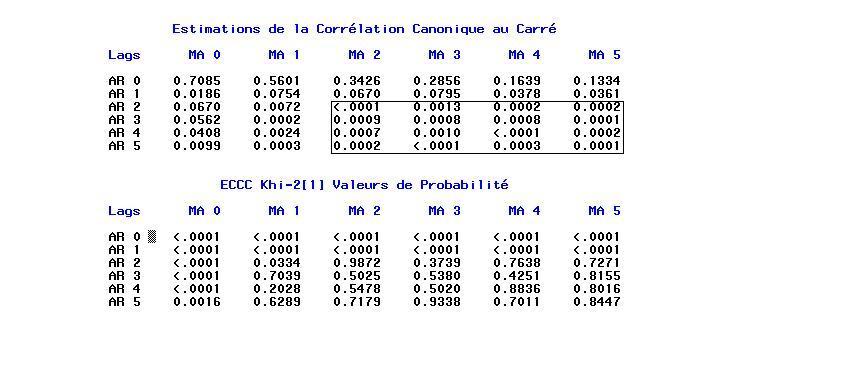
scan pour vérifier que le modèle ARMA(2,2)
ajuste bien ce processus. Pour comprendre la méthode SCAN on peut lire
le manuel de SAS
http://www.math.u-bordeaux1.fr/~hzhang/m2/st/SAS_ETS_ARIMA_SCAN.pdf
Corrigé
/* simulation ARMA(2,2) */
title1 'Simulated ARMA(2,2)';
data a;
     u1=0; u2=0; a1 = 0; a2=0;
     do i = -50 to 1000;
        a = 0.2*rannor( 32565 );
        u = 2.0+(0.1/1.32)*u1 + (1.0/1.32)*u2 + a - 2.4*a1 + 0.8*a2;
        if i > 0 then output;
        u2 = u1; u1 = u; a2 = a1; a1 = a;
     end;
run;

symbol1 interpol=join color=black value=none;
proc arima data=a;
	identify var=u scan; run;
	estimate p=2 q=2 plot method=ML; run;
quit;
On remarque la zone (rectangle) 0 commence par ARMA(2,2) (ou bien ARMA(3,1))

esacf pour vérifier que le modèle ARMA(1,2)
ajuste bien ce processus. On peut lire le manuel de SAS
http://www.math.u-bordeaux1.fr/~hzhang/m2/st/SAS_ETS_ARIMA_ESACF.pdf
Corrigé
/* simulation ARMA(1,2) */
title1 'Simulated ARMA(1,2)';
data a;
     u1=0; a1 = 0; a2=0;
     do i = -50 to 1000;
        a = 0.2*rannor( 32565 );
        u = 2.0+0.7575*u1 + a - 2.4*a1 + 0.8*a2;
        if i > 0 then output;
        u1 = u; a2 = a1; a1 = a;
     end;
   run;

symbol1 interpol=join color=black value=none;

proc gplot data=a;
	plot u*i;
run;
title1 'identify un arma(1,2) par esacf';
proc arima data=a;
	identify var=u scan; run;
	estimate p=1 q=2 plot method=ML; run;
quit;
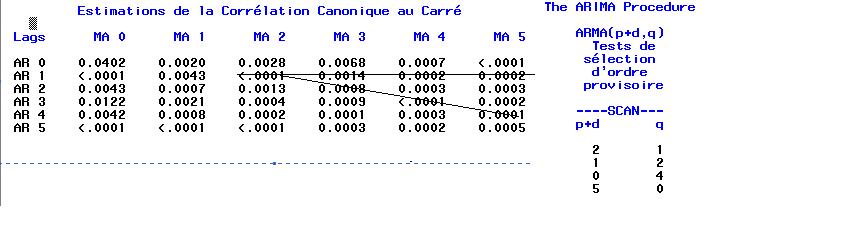
On remarque la zone (triangle) 0 commence par ARMA(2,1), les modèles
ARMA(1,2) est acceptable aussi
Corrigé
title1 'identify un arma(2,2) par scan et esacf';
proc arima data=a;
	identify var=u scan esacf; run;
quit;
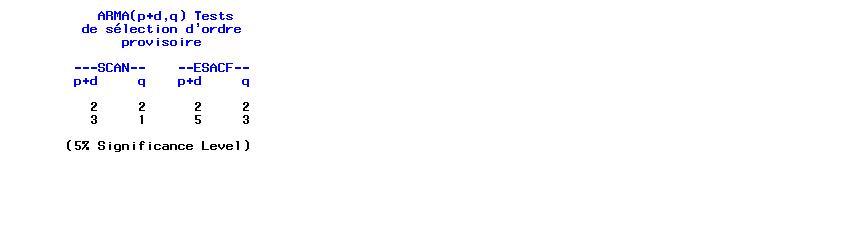
On remarque que SAS/ETS propose aussi plusieurs modèles, il est raisonable d'utiliser le modèle ARMA(2,2)
http://www.math.u-bordeaux1.fr/~hzhang/m2/st/SAS_ETS_ARIMA_MINIC.pdf
Corrigé
title1 'identify un arma(2,2) par scan et esacf';
proc arima data=a;
	identify var=u scan esacf minic; run;
quit;
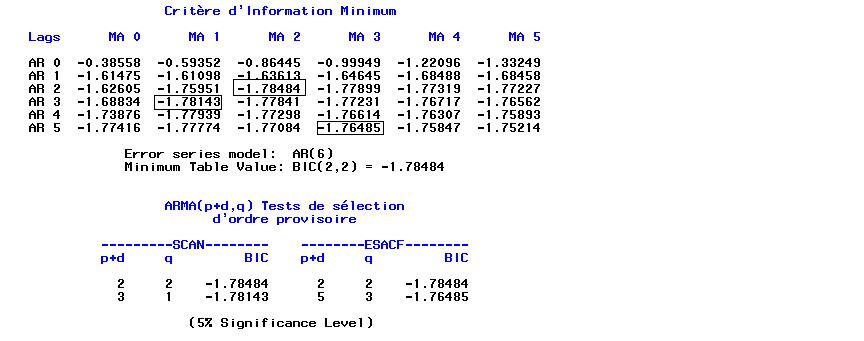
Plusieurs modèles sont acceptables, il est raisonable d'utiliser le modèle ARMA(2,2), car le BIC (Bayesian information criterion) est minimal.
minic.
http://www.stat.wisc.edu/~reinsel/bjr-data/index.html
Corrigé
data SeriesA;
	n=_n_;
	input x :3.1 @@;
	datalines;
 17.0 16.6 16.3 16.1 17.1 16.9 16.8 17.4 17.1 17.0 16.7 17.4 17.2 17.4
 17.4 17.0 17.3 17.2 17.4 16.8 17.1 17.4 17.4 17.5 17.4 17.6 17.4 17.3
 17.0 17.8 17.5 18.1 17.5 17.4 17.4 17.1 17.6 17.7 17.4 17.8 17.6 17.5
 16.5 17.8 17.3 17.3 17.1 17.4 16.9 17.3 17.6 16.9 16.7 16.8 16.8 17.2
 16.8 17.6 17.2 16.6 17.1 16.9 16.6 18.0 17.2 17.3 17.0 16.9 17.3 16.8
 17.3 17.4 17.7 16.8 16.9 17.0 16.9 17.0 16.6 16.7 16.8 16.7 16.4 16.5
 16.4 16.6 16.5 16.7 16.4 16.4 16.2 16.4 16.3 16.4 17.0 16.9 17.1 17.1
 16.7 16.9 16.5 17.2 16.4 17.0 17.0 16.7 16.2 16.6 16.9 16.5 16.6 16.6
 17.0 17.1 17.1 16.7 16.8 16.3 16.6 16.8 16.9 17.1 16.8 17.0 17.2 17.3
 17.2 17.3 17.2 17.2 17.5 16.9 16.9 16.9 17.0 16.5 16.7 16.8 16.7 16.7
 16.6 16.5 17.0 16.7 16.7 16.9 17.4 17.1 17.0 16.8 17.2 17.2 17.4 17.2
 16.9 16.8 17.0 17.4 17.2 17.2 17.1 17.1 17.1 17.4 17.2 16.9 16.9 17.0
 16.7 16.9 17.3 17.8 17.8 17.6 17.5 17.0 16.9 17.1 17.2 17.4 17.5 17.9
 17.0 17.0 17.0 17.2 17.3 17.4 17.4 17.0 18.0 18.2 17.6 17.8 17.7 17.2
17.4;

symbol1 interpol=join color=black value=none;
proc gplot data=SeriesA;
	plot x*n;
run;
quit;

proc arima data=SeriesA;
	/* identify var=x nlag=12 scan;run;*/
	/* identify var=x esacf; run; */
	/* identify var=x scan esacf;*/
	/* identify var=x stationarity=(adf=(5,6,7,8));*/
	/* identify var=x(1) minic;run;*/
	identify var=x(1) minic scan esacf; run;
quit;
Lire le manuel exemple SAS/ETS
http://www.math.u-bordeaux1.fr/~hzhang/m2/st/SAS_ETS_ARIMA_SERIESA.pdf